
How Computers Work: Explained from First Principles

If you are following my blog, you might know that my plan for this year is to learn and program low-level systems. I wanted to develop an operating system since I was in college. I never got enough time back then. But now I have plenty of time to work on skills other than my job.
I spent last month learning about how a computer is basically made and how a CPU performed all these magical tasks from the absolute beginning.
The main resource that I used to learn this stuff was Nand2Tetris. In this post I will be going to tell you how a computer works. I will not dive into that many technical details as of Nand2Tetris, but I will discuss everything that you need to understand how a computer works.
IMPORTANT - Please note that I am neither an expert in low-level systems nor a computer science veteran from the 1980s. This post is written For people who work on low-level languages so that they can understand their computer from first principles. This post is intentionally kept simple.
Bit - Represent 0 or 1
A bit is the smallest and most fundamental unit in a computer. It present either 0 or 1. A computer is just a machine that manipulates bits. Everything in your computer happens because it is manipulating some bits; there is no magic in it.
How do computer represent bits?
There is a tiny semiconductor device known as a transistor which acts like a switch. If the switch is off, the value is considered 0, and if the switch is on, the value is considered 1. Modern CPUs consist of billions of transistors. For example, Apple’s M1 chip contains 16 billion transistors.
Manipulating Bits - Logic Gates
So in order to manipulate these bits, we need something called a logic gate. A logic gate is a fundamental electrical circuit that performs several operations on these bits. I really don’t know how these electrical circuits are made from an electrical engineering perspective because I am from computer science, and I really don’t even care.
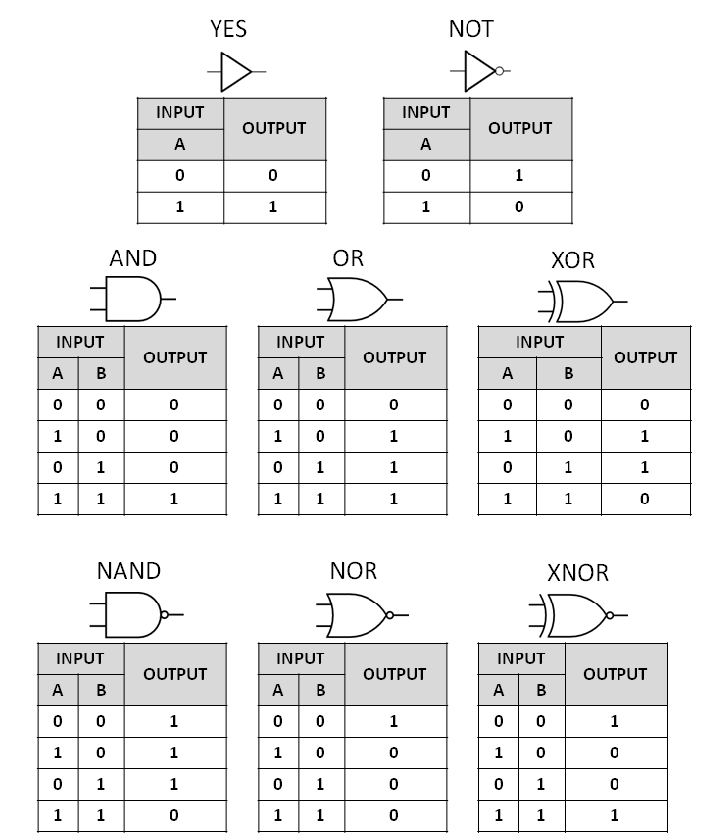
We have different types of gates, and here are a few of them that you should really care about.
NOT - Reverse the bit value.
AND - Output 1 if both inputs are 1 else 0.
OR - Output 1 if any one input is 1 else 0.
XOR - Output 0 if both inputs are same else 1.
NAND - Combination of NOT & AND Gate. AND the inputs and NOT the result.
NAND is universal gate.
NAND is called a universal gate because it can be used to make all other gates. It really doesn’t matter if you know how to make all other gates by using NAND gates if you are not interested in low-level stuff. But you can always Google this topic, and it is not that hard to understand.
What about conditional manipulation?
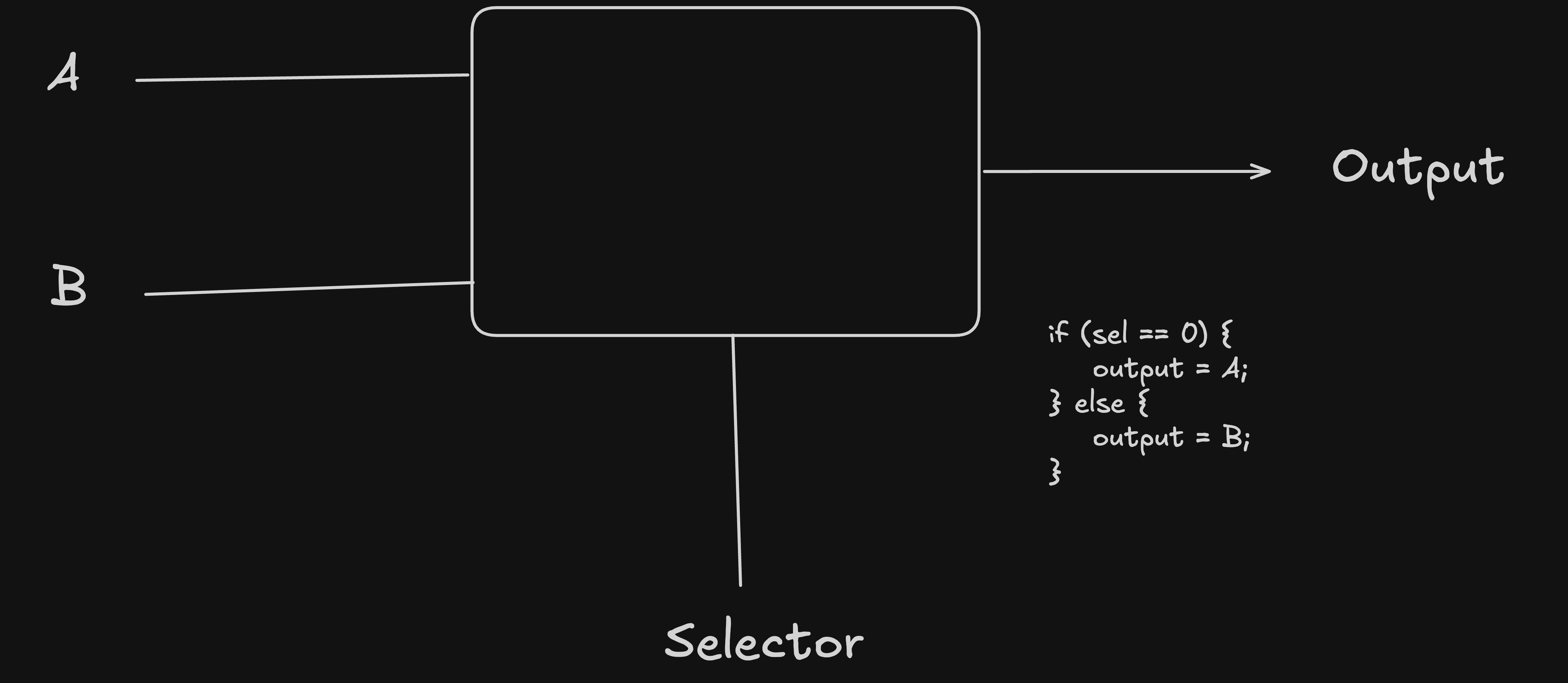
We can also perform conditional logic on bits using something called a multiplexer. But it does take two inputs and a third input known as a selector. If the value of the selector is 0, Multiplex will output input A; else, it will output input B.
I’m building an Open Source Integration Engine to make SaaS integrations easy.
You can check it: Connective
Open source contributions are also welcome in this project.
Counting Number
As of now we know how to represent 0 and 1 in a computer and how to manipulate them, but it is not enough to just represent 0 and 1 because we need to count numbers. Computers will not understand our counting because we use the base 10 system. Understand the base then with this calculation:
476

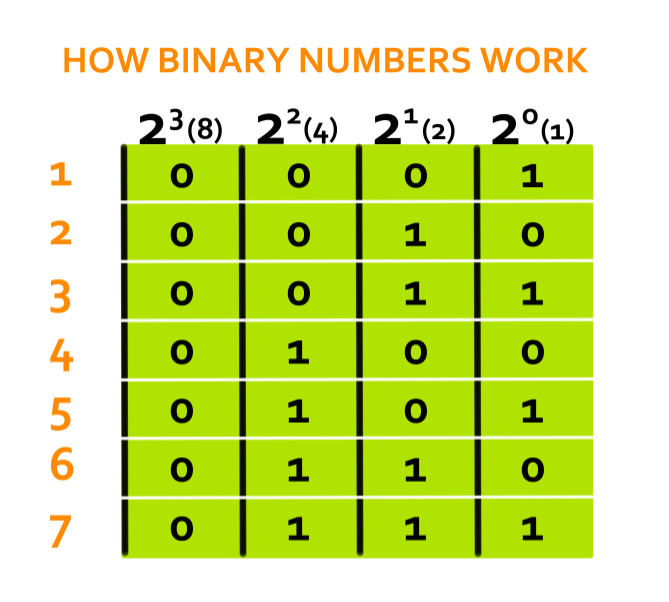
But in computers we don’t have base 10 counting, so we invented binary counting, which is based on 2, not 10. This example will make it more clear. For example, the binary number 101 is equal to:
101

Show number 5 is defined as 101 in binary system. Here is a visual representation of more binary numbers.
Mathematical Operations
The next step in our progress is to learn how computers will perform mathematical operations such as adding, subtracting, multiplying and dividing on these representations of numbers that are done using bits. This is the time when other chips will come into play. There are special chips designed to perform these mathematical operations.
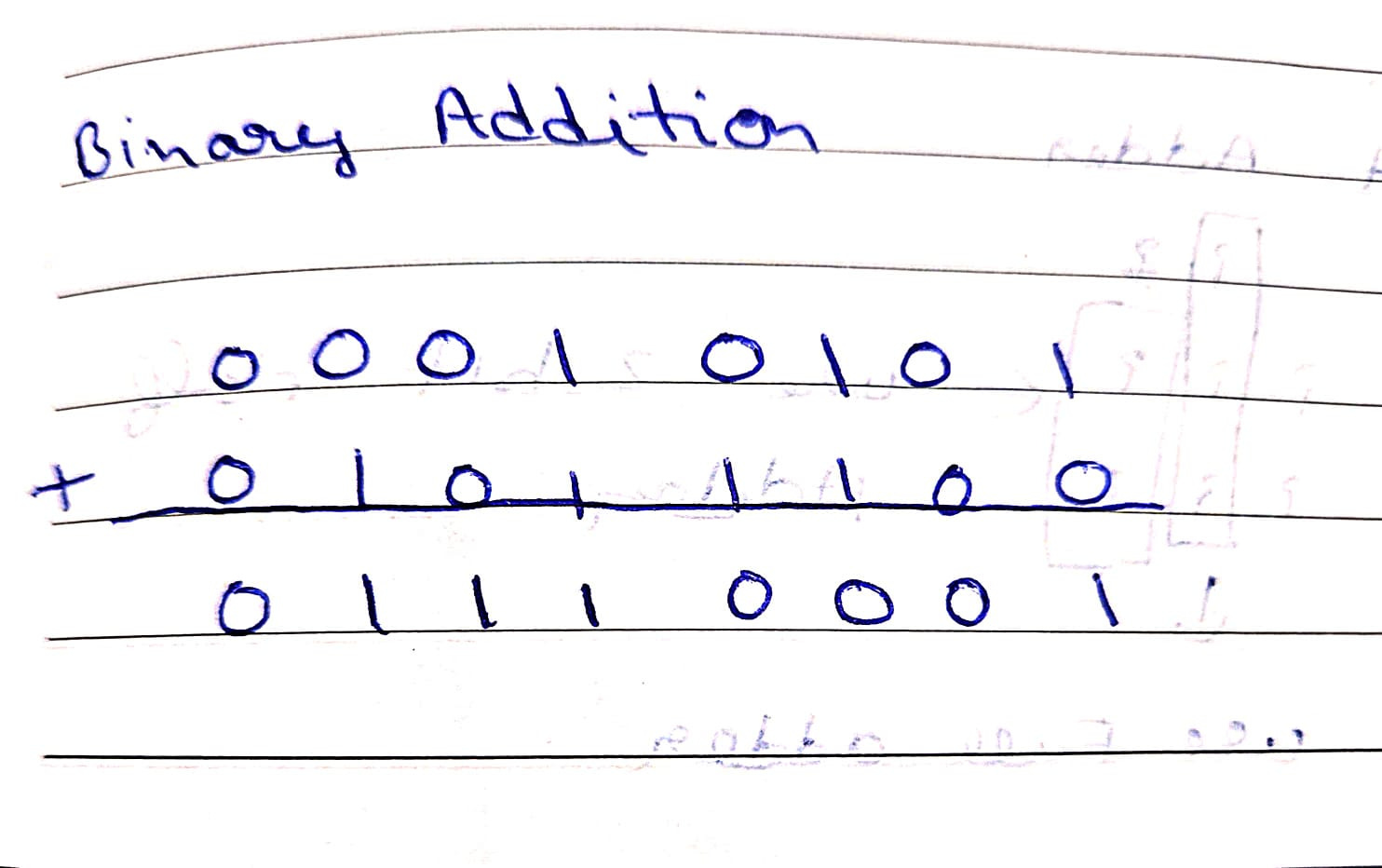
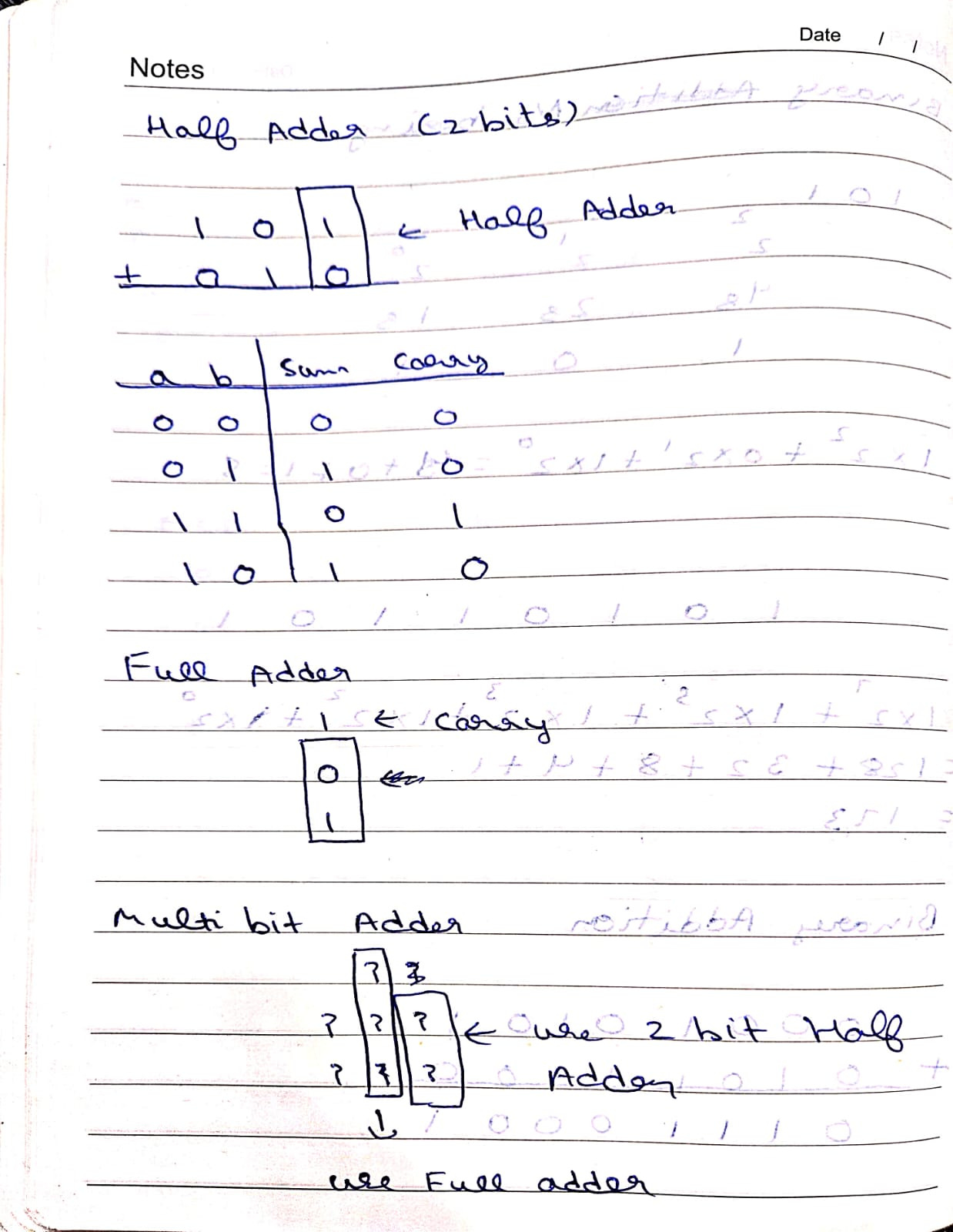
Binary addition is the same as normal addition, which we learnt in junior classes. The only difference is that it involves only 0 and 1. All the addition is done by keeping the binary number system in mind.
When we are adding 1 + 0, the output will be 1 because that’s what it is. But while adding 1 + 1, the output will be 10 because this is how we present the 2 in binary number system. You can check that in the image above. You have to perform simple addition but convert decimal numbers into binary numbers. Also, you can follow the concept of carry forward.
Only 0 or 1 can fit in one bit. So we sent the remaining number as carry. Below is another example to understand this deeply.
Limits of Binary Numbers
You can’t just store any number in the binary system in a computer. There is a maximum value that you can be stored in a computer and that depends upon the computer architecture, or, in simple words, how many bits this computer can work with. In modern times computers are of 64 bits, which means that they can perform 64 bit operation at max.
This leads us to the question what maximum number can be stored on different computers with different bits architecture.
1 bit → 0 to 1
2 bits → 0 to 3
3 bits → 0 to 7
4 bits → 0 to 15
5 bits → 0 to 31
6 bits → 0 to 63
7 bits → 0 to 127
8 bits → 0 to 255
16 bits → 0 to 65,535
32 bits → 0 to 4,294,967,295
64 bits → 0 to 18,446,744,073,709,551,615
I’m building an Open Source Integration Engine to make SaaS integrations easy.
You can check it: Connective
Open source contributions are also welcome in this project.
Negative Number
Computers also need to represent negative numbers, but I will not discuss those in this post, as it is a little bit complex and I just don’t want to lose your attention. Although I am sharing this video link, which you can use to learn more about representing negative numbers.
Arithmetic Logical Unit
Now we have some building blocks that we can use to make an ALU. A CPU consists of several parts, and ALU is one of them. It is a part of the CPU that is responsible for performing all the mathematical operations. Whenever the CPU has to perform any kind of mathematical and logical operation, it will ask the ALU to do it.
If I talk about designing an ALU, then you will need to combine the chips that we discussed earlier in order to make it capable of performing mathematical and logical operations.
Remembering Things
As of now we are just giving some input to our computer, and it is giving us some output, but that is not enough. We need our computer to remember things. Just like in programming, you declare a variable, and your computer remembers that variable, and whenever you want to use the value, you can ask a computer for the value. This is where your registers come into play.
Registers
Registers are the most fundamental memory elements that you can use to store and remember values. They are extremely fast and instantly accessible storage elements because they are located directly inside the CPU.
Storage Devices
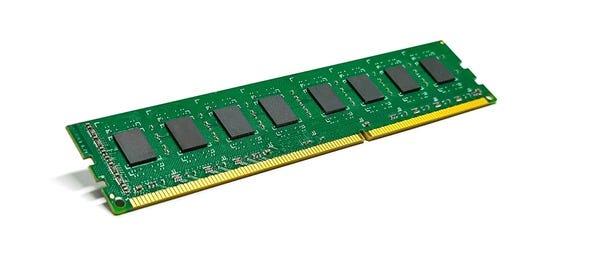
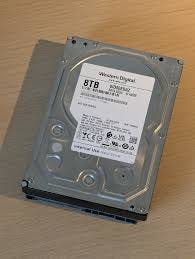
A computer will also require some kind of storage to store the data. This is where devices like RAM, HDD & SSD come into play. There are different things that are stored in different types of storage.
RAM:
Operands for instructions
Instruction pointer, stack pointer
Temporary results during execution
You might have heard that your applications are running into the RAM. What it means is that RAM is the memory where all the instructions for your application are stored. But the thing is that is a dynamic memory, so if you just switch off your computer, all your data will be lost.
HDD & SSD
Persistent Data
If you need to store some data that you need after restarting your computer, then you stole it here. The reason RAM can’t store data permanently is because it is fast but temporary, and the reason HDD and SSD can store data permanently is because they are slow but persistent.
I’m building an Open Source Integration Engine to make SaaS integrations easy.
You can check it: Connective
Open source contributions are also welcome in this project.
How CPU operate on RAM?
Think of RAM as a very long array which can be used to store and retrieve data. Every cell in RAM can store data and is represented by a unique address.
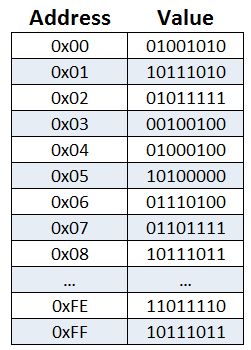
CPU says “Hey RAM! I need you to give me value at this address. It can also say “Hey RAM! Store this value in following address”.
Fetch, Decode & Execute
When you write a computer program, In any high-level language, it is converted into computer instruction at the end of the day. A computer instruction is a collection of 0 and 1. Our CPU will execute these instructions one by one, and this is how your programs are executed.
Whenever a computer needs to do some operations, it will fetch data from memory to registers, execute the operation with the help of the ALU and save back the data to memory.
Fetch
The CPU needs an instruction to process.
There is a special register called Program Counter (PC).
PC holds a memory address. That address points to the next instruction.
Steps:
CPU asks for next instruction data from RAM.
RAM returns the instruction bits
Instruction is loaded into the Instruction Register.
Program Counter is incremented by 1.
Decode
Now the CPU looks at the bits it just fetched from RAM.
Example instruction (simplified):
ADD R1, R2 // Adds 2 values
In reality, this is just 0 and 1:
1010100100010010
Decoding means:
Split the instruction into fields:
Opcode → What operation? (ADD, LOAD, JUMP)
Operands → Values on which operation need to be performed.
Execute
Now CPU will actually execute the instruction. Depending on the instruction, execution may involve:
Examples:
Arithmetic Instruction: ALU adds two numbers and store result in a register.
Memory Instruction: Calculate address and Read or Write from or into RAM.
Jump Instruction: Just jump to a specific instruction.
That’s It
So this is how you can understand A computer performs operations in a very abstracted way. Of course there are several other things that I didn’t include in this post to keep it more friendly and easy to read. I will be sharing my progress on this newsletter, and if you want to follow along, you can subscribe to it for free.
Here are the other post of this newsletter in case if you find something interesting.